NYT Connections Helper Is Live in the Chrome Web Store
 Bruce Hart
The most important change here is simple: you can install NYT Connections Helper directly from the Chrome Web Store now.
As of March 29, 2026, the extension is approved and live in the Chrome Web Store.
I originally built this as a userscript, which was fine for me and fine for anyone comfortable with Tampermonkey. But it also meant one more setup step before the tool could be useful.
Turns out a lot of side projects are not blocked by missing features. They are blocked by a little too much setup friction.
NYT Connections Helper is still a lightweight helper, not a solver. It lets you color-code candidate groups before you submit a guess, apply category colors to selected cards with toolbar buttons, and keep a clearer visual map of your current theory while you work through the board.
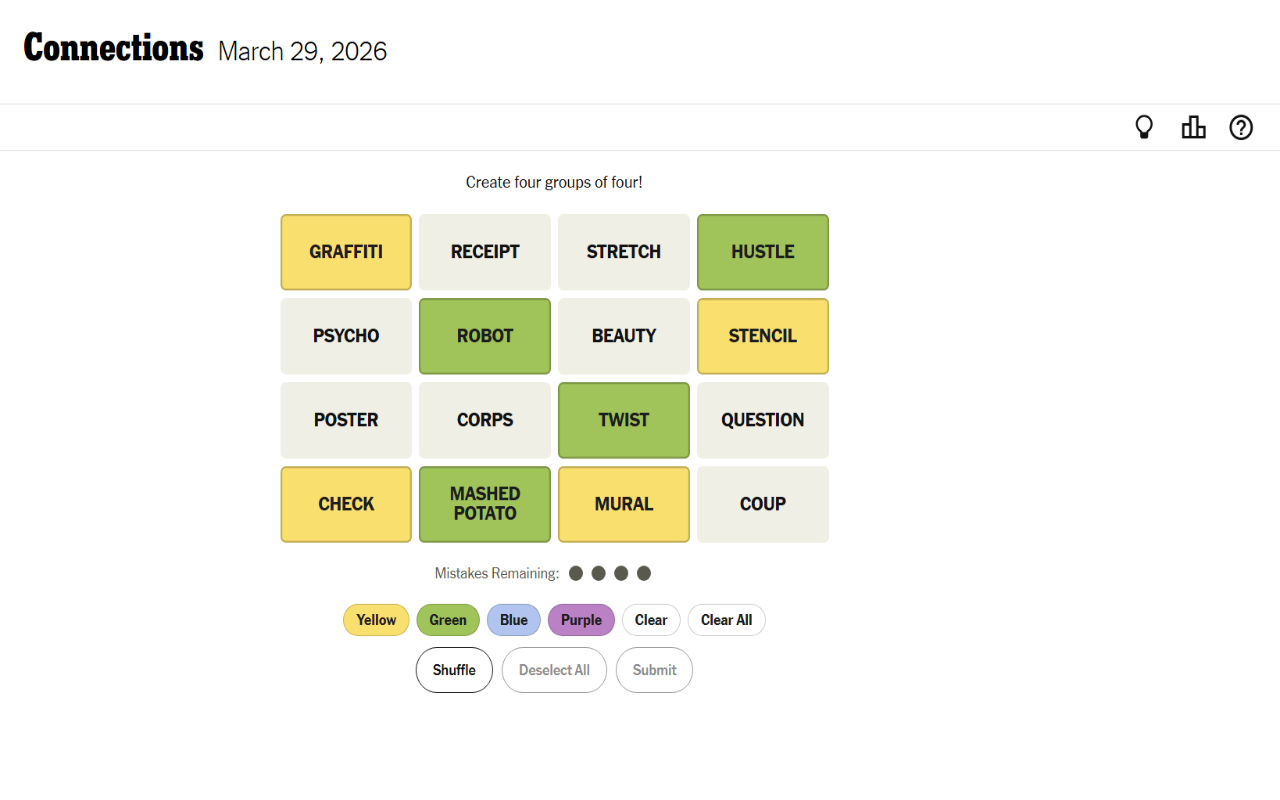
The extension version also adds configurable category settings. You can change the number of active categories, rename them, adjust the background colors, and change the text colors too. That makes the helper more flexible without changing the basic idea.
The real feature is less setup friction
Userscripts are great if you like software the way hobbyists like software. They are fast to build, easy to tweak, and perfect for "I want this on my machine right now."
The problem is that they are not how most people want to install things. If the first instruction is "first install another extension so this extension-like thing can exist," you have already lost part of the audience.
That is why moving this into a real Chrome extension mattered more than any single UI tweak. It changed the project from something a technically curious person might try into something ordinary Chrome users can install in one step.
Not more power, but less hassle.
I like small software because it forces this kind of honesty. If a tool is only marginally useful, extra setup can kill it. If it is actually useful, making it easier to install is one of the highest-leverage improvements you can ship.
Custom categories make it a better scratchpad
The bigger functional addition in the extension version is category settings.
You can keep the familiar four-category setup, but you are not locked into the game's exact defaults anymore. You can change how many active categories you want, rename them, change the background colors, and change the text colors. There is also a popup and a real options page, plus restore-defaults actions if you want to get back to the baseline quickly.
That sounds small, but I think it changes the personality of the tool.
The helper is not trying to solve Connections for you. It is trying to make your own thinking easier to externalize. Sometimes I want the classic yellow / green / blue / purple progression. Sometimes I want a different visual language entirely. Sometimes I want an extra holding bucket for "these four might go together, but I am not ready to commit yet."
It is also useful if you like playing with a strategy that is a little weirder than the default rhythm of the game. If you like trying to find Purple first, or you are doing Reverse Rainbow because you want to earn the badge, being able to mark and revisit tentative groups is genuinely helpful.
That extra flexibility is the kind of tiny product detail I love. It acknowledges that puzzle-solving is messy. People do not always think in neat finished groups. Good tools make room for intermediate states.
Extensions are a better packaging layer than userscripts
One thing I like about this version is that it stays small and boring under the hood.
The extension only asks for Chrome's storage permission. It only runs on the two NYT Connections game URL patterns. The settings live locally in chrome.storage.local. The current Chrome Web Store listing also says the extension does not collect or use your data, which is exactly how I wanted this project to work.
That matters to me because browser helpers can get sketchy fast. Once a tool starts asking for broad permissions, remote services, or mystery telemetry, the trust model changes. For something like this, I think the right design is the simple design: local settings, visible code, narrow scope.
In other words, not a platform. Just a useful little thing.
There is a nice side effect here too: turning the userscript into an extension forced a bit more product discipline. A userscript can be delightfully scrappy. An extension has to be packaged, described, permissioned, and understandable. That is good pressure. It makes you answer the question, "what exactly is this tool, and what exactly should people trust it to do?"
Open source keeps small software honest
The code is on GitHub: brucehart/nyt-connections-helper.
So if you want to install it from the Chrome Web Store and never think about the implementation, great. If you want to read the manifest, check the permissions, or load it unpacked yourself, that path is open too.
That balance is probably my favorite part of shipping on the web: convenience for normal use, inspectability for curious use.
This is the kind of software I want to keep making
There is nothing world-changing here. It is a Chrome extension for a word puzzle. Version 0.1. About 35 KB in the current store listing. Extremely not enterprise software.
But I like projects like this because they sit at a fun intersection of usefulness, weirdness, and restraint. They are small enough to ship quickly, specific enough to be opinionated, and concrete enough that you can actually tell whether they made something better.